
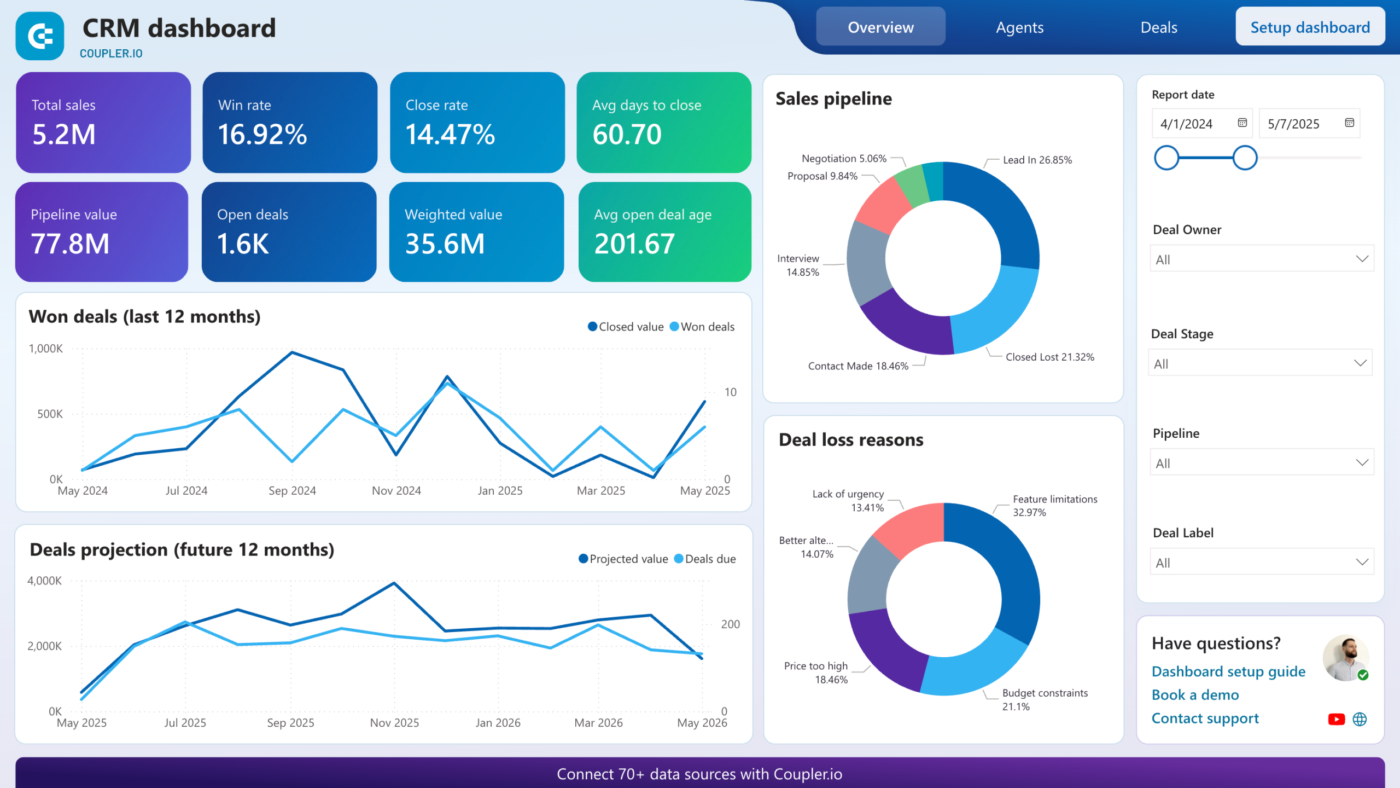

Choosing a CRM in 2026 is harder than it sounds. There are roughly 700 platforms on the market, every vendor’s homepage claims to be “the best,” and the real difference between a good fit and a bad one usually only shows up six months after you’ve signed the contract.
This guide cuts through the noise. Below, we compare the 10 CRM platforms most worth your time in 2026 — with real pricing, honest trade-offs, and a simple framework for picking the right one for your business, not just the one with the biggest marketing budget.
What Is CRM Software?
Customer Relationship Management (CRM) software is a centralized system for tracking every interaction your business has with leads and customers — contact details, emails, calls, deal stages, support tickets, and purchase history. Instead of scattering that information across spreadsheets, inboxes, and sticky notes, a CRM keeps it in one searchable place so your team can follow up faster and close more deals.
Modern CRMs go well beyond a contact database. Most 2026 platforms also include:
- Pipeline and deal management — visual boards for tracking where each opportunity stands
- Marketing automation — email sequences, lead scoring, and campaign tracking
- AI assistants — deal summaries, next-best-action suggestions, and predictive forecasting
- Reporting and analytics — dashboards for pipeline health, rep performance, and revenue forecasts
- Integrations — native connections to email, calendars, and tools like Slack or Zapier
The global CRM market is projected to reach roughly $88–112 billion in 2026, which is exactly why the “best” option depends entirely on your business model, team size, and sales process — not on which platform has the longest feature list.
How We Compared These CRMs
Rather than ranking by hype, we evaluated each platform on:
- Fit for business type — ecommerce, B2B, agency, or enterprise
- Ease of adoption — how fast a non-technical team can get productive
- Real-world pricing — including add-ons and hidden costs, not just the sticker price
- Depth of features — automation, AI, and customization
- Scalability — whether it grows with you or forces a migration later
The 10 Best CRM Software Platforms in 2026
1. Salesforce — Best for Large, Complex Sales Teams
Salesforce remains the most customizable and feature-rich CRM available, and it still commands roughly 23% of the CRM market. It’s built for organizations that need deep sales automation, lead scoring, forecasting, and CPQ (configure-price-quote) functionality, backed by the massive AppExchange ecosystem for extending nearly any workflow.
- Best for: Enterprises and large sales teams needing extensive customization
- Pricing: Starter Suite from ~$25/user/month (capped at 10 users), scaling to Professional (~$75), Enterprise (~$150), and Unlimited (~$300+) per user/month
- Watch out for: Contracts often include automatic annual price increases, and essential add-ons (Marketing Cloud, Field Service, CPQ) are sold as separate SKUs at $75–300/user/month each
- Trade-off: Unmatched depth, but implementation and admin overhead are significant. Budget for a certified admin or implementation partner.
2. HubSpot — Best for Inbound Marketing + Sales in One Platform
HubSpot pairs a genuinely usable free CRM tier with polished sales, marketing, and service hubs. It’s the go-to choice for B2B companies that want deep pipeline management alongside strong inbound marketing tools, without stitching together separate platforms.
- Best for: B2B companies with sales reps who also lean on content and inbound marketing
- Pricing: Free tier available; paid Sales Hub plans scale from roughly $20 to $150+/user/month depending on tier
- Trade-off: The free and entry tiers are excellent, but costs climb quickly once you need marketing automation and multiple hubs together.
3. Zoho CRM — Best Value for Money
Zoho consistently wins on price-to-feature ratio. It serves over 250,000 businesses with a real (not gimped) free plan for up to 3 users, and paid tiers that undercut nearly every competitor at a comparable feature level.
- Best for: Budget-conscious SMBs that want an all-in-one platform covering sales, marketing, and support
- Pricing: Free (up to 3 users) → Standard ~$14/user/month → Professional ~$23 → Enterprise ~$40 → Ultimate ~$52 (all billed annually; monthly billing runs ~20% higher)
- Standout features: Zia AI assistant, Blueprint process automation, territory management, and the wider Zoho ecosystem (Desk, Analytics, Campaigns)
- Trade-off: More powerful than Pipedrive dollar-for-dollar, but the UI has a steeper learning curve and more menus to navigate.
4. Pipedrive — Best for Sales-Only Teams Who Want Simplicity
Pipedrive was built by salespeople who wanted a CRM focused purely on moving deals through a pipeline — not a bloated marketing suite. Its drag-and-drop pipeline view is widely considered one of the most intuitive in the category.
- Best for: Small to mid-sized sales teams (5–50 reps) who want reps productive on day one
- Pricing: Essential ~$14/user/month → Advanced ~$34 → Professional ~$49 → Power ~$64 → Enterprise ~$99 (annual billing)
- Trade-off: No permanent free plan, and useful features (lead generation, e-signatures, campaigns) are gated behind paid add-ons billed per company.
5. Microsoft Dynamics 365 Sales — Best for Microsoft-Centric Organizations
If your company already lives in Microsoft 365, Teams, and Outlook, Dynamics 365 offers a level of native integration — including Copilot AI for deal summaries and predictive forecasting — that few competitors can match.
- Best for: Enterprises already standardized on Microsoft 365, Teams, and Azure
- Pricing: Roughly $65–105/user/month for mid-tier plans
- Trade-off: It’s less a single product than an ecosystem of interconnected modules, which means implementation complexity scales with how many modules you adopt.
6. monday.com CRM — Best for Visual, Project-Driven Sales Processes
monday CRM sits on top of monday.com’s popular work-management platform, making it a strong choice for teams that think in boards and workflows rather than traditional pipelines — especially agencies managing sales and delivery in the same place.
- Best for: Teams that want a lightweight CRM inside a broader project-management tool
- Trade-off: Less specialized than dedicated sales CRMs; best when CRM is a secondary need rather than your core sales engine.
7. Freshsales (Freshworks CRM) — Best for Built-In AI and Telephony
Freshsales brings Freshworks’ customer-service DNA to sales, with strong built-in calling features and a clean, modern interface.
- Best for: Mid-sized teams wanting AI-assisted lead scoring without Salesforce-level complexity
- Pricing: Entry plans around $9–14/user/month
- Trade-off: Smaller app ecosystem than Zoho or Salesforce.
8. GoHighLevel — Best for Agencies Managing Multiple Clients
GoHighLevel unifies website funnels, campaigns, and sales activity, making it popular with marketing agencies that need to run CRM operations for several client brands from one dashboard.
- Best for: Agencies and service businesses managing multiple accounts
- Trade-off: Less polished UX and fewer native integrations than HubSpot, but far more accessible pricing for the functionality.
9. NetSuite CRM — Best for Businesses Already on NetSuite ERP
For companies running NetSuite as their ERP, the built-in CRM module is essentially free to add and shares data seamlessly with finance, inventory, and order management.
- Best for: Mid-market and enterprise companies wanting CRM unified with ERP data
- Trade-off: Not a strong standalone choice if you’re not already on NetSuite.
10. Capsule CRM — Best Simple, Contact-Focused CRM
For solo founders and small teams that just need clean contact and deal tracking without heavy automation, Capsule offers a straightforward free tier and simple pricing.
- Best for: Very small teams or relationship-based selling with minimal complexity
- Trade-off: Limited automation and reporting depth compared to the platforms above.
Quick Comparison Table
| CRM | Best For | Starting Price (per user/mo, annual) | Free Plan? |
|---|---|---|---|
| Salesforce | Large, complex enterprises | ~$25 | No |
| HubSpot | Inbound marketing + sales | $0 | Yes |
| Zoho CRM | Best value for money | ~$14 | Yes (3 users) |
| Pipedrive | Sales-only simplicity | ~$14 | No (14-day trial) |
| Microsoft Dynamics 365 | Microsoft-heavy orgs | ~$65–105 | No |
| monday.com CRM | Visual, project-driven teams | Varies | Limited trial |
| Freshsales | Built-in AI and calling | ~$9–14 | Yes |
| GoHighLevel | Agencies with multiple clients | Custom | No |
| NetSuite CRM | NetSuite ERP customers | Bundled with ERP | No |
| Capsule CRM | Solo founders, simple needs | $0 | Yes |
Pricing reflects publicly listed rates as of mid-2026 and is subject to change — always confirm current pricing directly on each vendor’s site before purchasing.
How to Choose the Right CRM for Your Business
The best CRM for 2026 isn’t the one with the flashiest feature list — it’s the one that matches how your business actually sells. Before comparing vendors, work through these three questions:
1. What’s your business model? Ecommerce brands need lifecycle marketing and order-data integration. B2B companies with longer sales cycles need deep pipeline and forecasting tools. Agencies need multi-client flexibility. A great CRM for one of these can be a poor fit for another.
2. How much complexity can your team actually handle? A powerful CRM your team won’t use is worse than a simple one they adopt on day one. If you don’t have a dedicated CRM admin, weigh usability as heavily as feature depth.
3. What’s the real cost, not just the sticker price? Add-ons, integrations, implementation time, and training can inflate the “real” cost of a CRM 2–4x beyond the advertised per-seat price. Ask every vendor directly: what does a fully functional setup cost once I add the features I actually need?
Common CRM Implementation Mistakes to Avoid
CRM rollouts fail 30–70% of the time — and it’s almost never the software’s fault. The most common causes:
- Buying more platform than you need. Overbuying complexity means months spent forcing your business into someone else’s sales model instead of the other way around.
- Skipping end-user input. Involve the sales reps who’ll actually use the tool from day one, not just leadership.
- Underinvesting in training. Even the best CRM fails if adoption stalls in week two.
- Messy data migration. Duplicate records and inconsistent formatting from old spreadsheets or legacy systems cause ongoing headaches — treat migration as its own project with a test import first.
Frequently Asked Questions
What is the best CRM software overall in 2026? There’s no single “best” CRM — Zoho CRM offers the strongest value for budget-conscious SMBs, Pipedrive wins on simplicity for sales-only teams, HubSpot leads for inbound marketing integration, and Salesforce remains the standard for large, complex enterprises.
What is the cheapest CRM software? Zoho CRM, HubSpot, and Freshsales all offer functional free tiers. Zoho’s free plan supports up to 3 users, while HubSpot’s free CRM has no user cap but limits advanced automation.
Which CRM is easiest to use? Pipedrive is consistently rated among the easiest CRMs to adopt, thanks to its visual, drag-and-drop pipeline. HubSpot’s free tier is also beginner-friendly.
How much does CRM software cost per user? Entry-level plans typically run $9–14/user/month, mid-tier plans $20–65/user/month, and enterprise plans $75–350/user/month, not including add-ons or implementation costs.
Is a free CRM good enough for a small business? For very small teams (1–5 people) with simple needs, free tiers from Zoho, HubSpot, or Capsule are genuinely usable. Growing teams typically outgrow free tiers within the first year as automation and reporting needs increase.
Final Takeaway
The right CRM is the one that fits how your team actually sells — not the one with the most checkboxes on a features page. Start by mapping your sales process, set a realistic budget that accounts for add-ons and training, and shortlist two or three platforms from the list above before committing to a trial. Getting this decision right the first time saves months of migration pain later.





I like that you focused on choosing a CRM based on longCRM Blog Comment Guide-term fit instead of just feature lists or marketing claims. One thing that also makes a big difference is how easily a team actually adopts the system—an intuitive workflow and a clear onboarding plan often have a bigger impact than having dozens of advanced features that rarely get used.
Ya you are Right